


When you buy through links on my site, I may earn an affiliate commission.
Quick Verdict on LinkBoss
LinkBoss is an AI-powered internal linking tool for WordPress websites that automates internal link building, finds orphan pages, builds topic clusters and silos, and manages internal linking across multiple sites from one dashboard. It works through a credit-based system starting at $11/month (200 credits) for the Starter plan.
Rating: 4.6 / 5
Best for: Bloggers, SEO professionals, and agencies managing 20+ pages or multiple WordPress sites.
Not ideal for: Brand-new sites with fewer than 10 published pages, or users on non-WordPress platforms.
Starting price: $11/month (Starter) or $0 trial with 100 free welcome credits — no credit card required.Standout feature: Bulk 2.0 auto internal linking + Site Visualizer that maps your entire interlinking structure on a single graph.
Why You Can Trust This LinkBoss Review?
Written by Kawkab Nadim — an SEO & GEO Executive with 7+ years of experience driving organic growth for agencies, e-commerce brands, and niche websites. He specializes in Technical SEO, AI search visibility, and high-converting WordPress web design using the Gutenberg, Elementor builder and Kadence ecosystem.
Track Record:
- Ranked 14 products on Google Page 1
- Built and sold a niche site for $70,000
- Focused on real business results over vanity metrics.
Welcome to my ultimate guide and review on perfecting the art of internal linking with LinkBoss!
Internal linking is a cornerstone of effective SEO, and in this guide, we’ll delve into how it can elevate your website’s visibility and user engagement.
In this resource, I’ll discover how to:
Ready to unlock the full potential of your internal linking strategy? Let’s dive in!
What is LinkBoss?
LinkBoss is an AI-powered internal linking SaaS tool designed for WordPress websites. It uses contextual AI to suggest relevant internal links, builds interlinks in bulk, creates topic-cluster and silo structures, detects orphan pages, and lets users manage internal linking across multiple sites from one central dashboard.
In the complex world of SEO, managing internal links efficiently can make or break a website’s performance. That’s where LinkBoss comes into play.
It’s an innovative tool designed to simplify internal linking, boost SEO rankings, and create a better user experience on your website.
LinkBoss isn’t just another SEO tool — it’s specifically built to take the prediction out of internal linking by providing smart, AI-driven recommendations.
Whether you’re managing a single blog or multiple sites, LinkBoss offers a streamlined solution that saves you time and effort.
Why is Internal Linking Important?
Internal linking is a crucial part of building a successful website.
It’s not just about connecting pages-it’s about enhancing the user journey and boosting your website’s SEO performance.
A well-structured internal linking strategy helps search engines discover and rank your content while guiding users through a logical path on your site.
But why exactly is it so vital?
Let’s break it down.
Key Internal Linking Facts (Backed by Google’s Own Guidance)
- Google explicitly confirms internal links matter: in its official Search Central documentation, Google states that internal links help search engines find new pages and understand site structure.
- Orphan pages are invisible to Google: pages with zero internal links pointing to them are significantly harder for Googlebot to discover and rank, according to Google’s crawling documentation.
- Anchor text is a known ranking signal: the original PageRank paper by Larry Page and Sergey Brin specifically calls out anchor text as a contributor to relevance signals.
- Topic clusters improve topical authority: the cluster-pillar model (popularized by HubSpot) is now widely accepted as a method to demonstrate subject-matter expertise to search engines.
- Three-click rule: a long-standing UX heuristic that says any page on a site should ideally be reachable within three clicks from the homepage — internal linking is what makes that possible.
Benefits for SEO and User Experience
Internal links help distribute page authority across your website.
By linking to related articles or product pages, you ensure that every piece of content has a chance to rank higher in search engine results.
This “link juice” boosts the overall SEO performance of your site, making it easier for Google to crawl and understand the relationships between your pages.
From a user perspective, internal links provide seamless navigation.
Visitors can easily jump from one relevant piece of content to another, which keeps them on your site longer and reduces bounce rates.
The more engaged your users are, the more likely they are to convert, whether that’s making a purchase, subscribing, or contacting you.
How LinkBoss Simplifies Internal Linking Through Automation?
Manually inserting internal links is time-consuming, especially on larger websites. This is where LinkBoss shines.
With its AI-powered automation, it takes the guesswork out of internal linking by suggesting relevant links for you.
The tool scans your content and finds opportunities to create meaningful connections between your pages, saving you hours of manual work.
Not only does this make the linking process faster, but it also ensures that your links are contextually relevant.
Optimizes your internal linking structure in a way that benefits both your visitors and search engines, improving your site’s overall performance.
Main Features of LinkBoss
Packed with cutting-edge features, this tool transforms internal linking (Semantic internal linking) into a smarter, faster, and more efficient process, making your SEO strategy effortlessly effective.
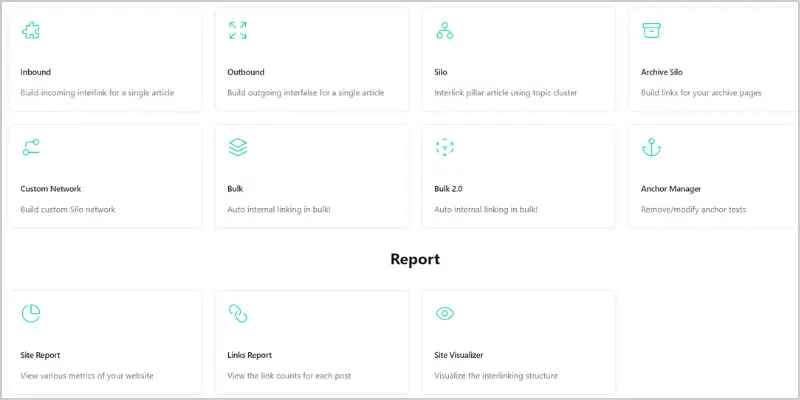
Here’s a breakdown of its key features:
AI-Powered Suggestions
LinkBoss takes the guesswork out of linking by using AI to suggest relevant internal links for your content.
The tool analyzes your pages and generates contextually appropriate links, saving you hours of manual work.
What makes it even better is that the AI learns over time, providing increasingly accurate recommendations as you use the tool.
For instance, if you’ve written a blog post about SEO strategies, it will suggest other posts on your site that discuss similar topics or that add depth to the subject.
You can then review the suggestions and insert links with a single click.
Bulk Link Building (Bulk + Bulk 2.0)
If your website has hundreds or even thousands of pages, linking each one manually would take forever.
Tired of manually linking each post? The bulk linking feature lets you add internal links to multiple posts in just a few clicks, streamlining your entire process.
Here’s how it works?
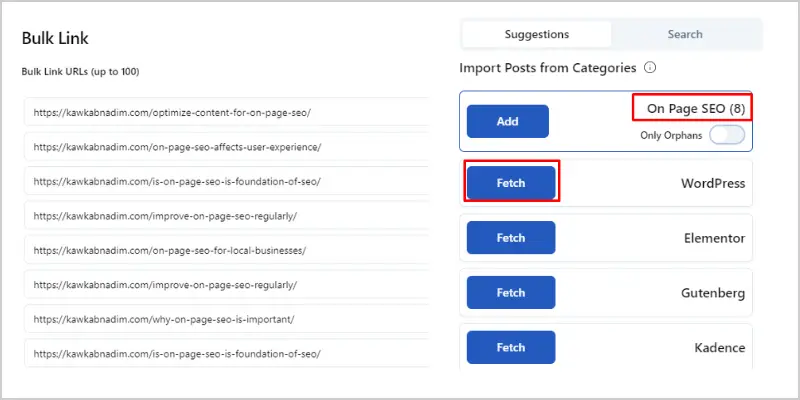
You upload a list of URLs or select categories of posts, and the tool generates internal links between them based on relevance.
This feature is particularly useful for large blogs or e-commerce sites, where managing internal links manually can become overwhelming.
Topic Clusters and Silos
One of the most advanced features of LinkBoss is its ability to help you build topic clusters and silos. These are groups of related posts that revolve around a central pillar page.
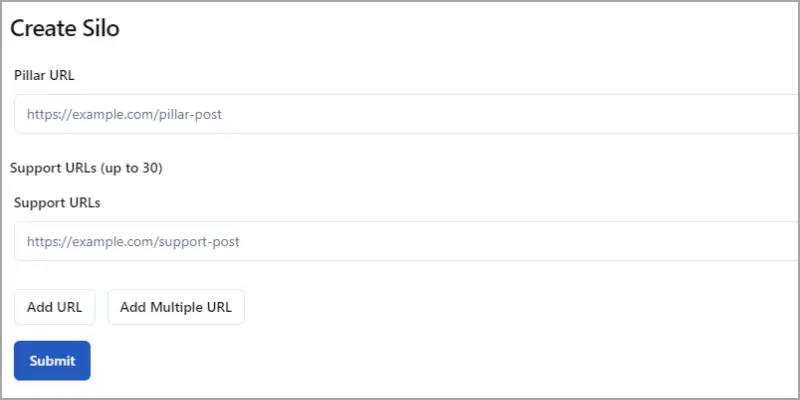
For example, if you run a fitness blog, your pillar post might be about general weight loss strategies, while your cluster pages cover specific topics like diet plans, workout routines, and mental health tips.
LinkBoss makes it easy to create these clusters by suggesting relevant posts to link together.
This helps boost your site’s topical authority, improving its relevance in the eyes of search engines and making it more likely to rank for competitive keywords.
Custom Interlinking Networks
With the Custom Interlinking Network Builder, you can create keyword-based internal linking strategies. By entering a keyword, the tool suggests pages from your site that are most relevant to that term.
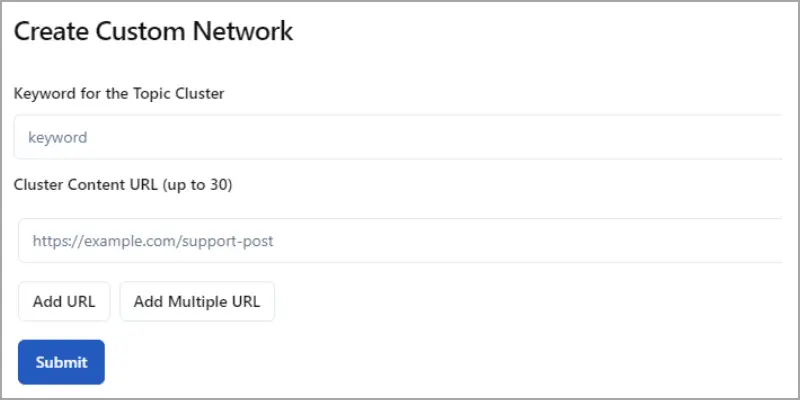
This allows you to create a network of interlinked posts that target specific keywords, enhancing your site’s overall SEO performance.
Detailed Reporting & Site Visualizer
LinkBoss generates reports showing the status of your internal links, highlighting orphan pages and potential issues.
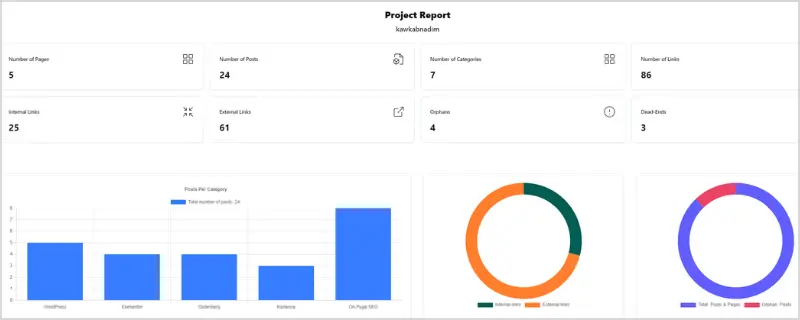
The Site Visualizer maps your entire interlinking structure on a single graph, so you can see exactly how link equity flows through your website.
Want a Clearer Picture of LinkBoss?
If you’re looking for a more detailed understanding of LinkBoss and how it works, I highly recommend checking out my suggested tutorials.
These step-by-step guides will walk you through everything-from setting up your account to mastering the advanced features.
Learn More About this Tool: For a clearer understanding of LinkBoss, explore my recommended articles in the knowledgebase category.
These posts will help you grasp how it can build up your internal linking and SEO efforts!
And the end, you’ll be ready to use LinkBoss like a pro!
How Does LinkBoss Compare to Competitors?
In the world of SEO tools, there’s no shortage of options for managing internal links. However, not all tools are created equal.
It stands out by offering a unique blend of AI-powered automation and bulk linking capabilities, but how does it compare to other popular tools like Link Whisper?
Let’s take a closer look at how these tools stack up in terms of features, usability, and overall value.
Comparison with Link Whisper and Others
When it comes to internal linking tools, both LinkBoss and Link Whisper are frequently mentioned.
While both can help streamline internal linking, they offer different features and approaches that might suit different types of users.
Here’s how they compare:
| Feature | LinkBoss | Link Whisper | Other Tools |
|---|---|---|---|
| AI-Powered Link Suggestions | Yes, highly advanced and adaptive to content | Yes — but less contextually relevant | Varies — often manual |
| Bulk Linking | Yes – bulk + Bulk 2.0 for multiple posts | No – links added individually | Limited or unavailable |
| Multi-Site Management | Yes – one dashboard for all sites | No – sites managed separately | Rarely available |
| Orphan Page Detection | Yes – flags pages with zero internal links | Limited functionality | Varies across tools |
| Topic Cluster / Silo Builder | Yes – built-in cluster + archive silo tool | No dedicated silo builder | Mostly absent |
| Ease of Use | User-friendly interface with minimal learning curve | Easy but lacks advanced features | Varies |
| Pricing | $11/m (Starter) or $0 trial | $77/year subscription | Subscription-based |
AI-Driven Suggestions
One of LinkBoss’s biggest advantages is its AI-powered link suggestions.
These suggestions are contextually relevant and adapt over time, providing smart, data-driven linking strategies.
In contrast, Link Whisper offers suggestions that are less precise and require more manual review.
Bulk Linking Capability
Both tools offer bulk linking, but LinkBoss takes it a step further with bulk interlinking features that let you link orphaned posts or entire categories quickly.
This gives you more control and flexibility over how your content is interlinked, especially on large websites.
Multi-Site Management
If you manage more than one website, this tool offers a single dashboard where you can manage internal links across multiple domains.
This is a game-changer for agencies or individuals who operate several sites, as it streamlines the entire linking process.
Link Whisper lacks this multi-site functionality, making LinkBoss the more efficient choice for larger operations.
Benefits and Drawbacks of Using LinkBoss (Pros and Cons)
Benefits
Drawbacks
Customer Service: My Personal Experience
Good customer service can make or break your experience with a tool, and LinkBoss delivers in this area.
When I faced an issue, their team stepped up with quick, efficient support.
Fast Response
After encountering trouble with my links, I contacted LinkBoss customer service.
To my surprise, they responded almost immediately. This fast response was a big relief, as I was stuck and needed quick assistance to get back on track.
Personalized Help
What stood out to me was how personalized their support was.
Instead of sending over a standard set of instructions, they walked me through the process step-by-step.
They even asked for screenshots of the issue to better understand my problem, ensuring their guidance was tailored to my specific situation.
Continuous Support
Once they identified that the issue was with my URL structure, they didn’t just leave me to figure it out alone.
The team kept me updated, reassured me that the fix was on the way, and followed up until the problem was fully resolved.
This level of support truly made me feel valued as a customer.
Support lists
- Live Chat – Check from website footer
- Email Support – Contact us via email: [email protected]
- Social media – Facebook Group
LinkBoss Pricing Plans (2026)
LinkBoss offers two pricing structures: Monthly subscription plans and Pay-As-You-Go credit packs. Here’s the structured breakdown:
Monthly Plans (Subscription)
|
Plan |
Price |
Credits & Sites |
Cost per Credit |
|---|---|---|---|
|
Starter |
$11/month |
200 credits (3 sites) |
$0.055/credit |
|
Growth (Most popular) |
$49/month |
1,000 credits (15 sites) |
$0.049/credit |
|
Enterprise |
$149/month |
4,000 credits (50 sites) |
$0.037/credit (best value) |
Pay-As-You-Go (Credits Never Expire)
|
Plan |
Price (Lifetime) |
Credits & Sites |
Cost per Credit |
|---|---|---|---|
|
Trial |
$0 (no CC required) |
100 welcome credits (1 site) |
Free |
|
Pro (for Solopreneurs) |
$69 |
1,000 credits (10 sites) |
$0.069/credit |
|
Advanced (Best for Businesses) |
$247 |
4,000 credits (50 sites) |
$0.061/credit |
Per-Credit Value Analysis: Which Plan Wins?
- Cheapest entry point: $0 Trial plan with 100 free welcome credits — zero risk.
- Best monthly value per credit: Enterprise at $0.037/credit (32% cheaper per credit than Starter).
- Best for non-monthly users: Pay-As-You-Go credits never expire, so unused credits don’t get wasted.
- Monthly vs Pay-As-You-Go: Monthly plans cost less per credit ($0.037–$0.055) than Pay-As-You-Go ($0.061–$0.069), but PAYG wins if your project work is irregular.
Who Should Use LinkBoss?
LinkBoss is ideal for:
- Content Creators: Bloggers and content marketers who want to simplify their internal linking process.
- SEO Professionals: Experts looking to automate internal linking and improve site structure for SEO.
- Website Owners: Anyone managing large websites with lots of content, especially those juggling multiple sites.
Frequently Asked Questions About LinkBoss
What is LinkBoss used for?
LinkBoss is used to automate internal linking on WordPress websites. It uses AI to suggest contextually relevant internal links, builds links in bulk across hundreds of posts, creates topic clusters and silos, identifies orphan pages, and lets users manage internal linking for multiple sites from one dashboard.
How much does LinkBoss cost?
LinkBoss starts at $11/month for the Starter plan (200 credits, 3 sites). The Growth plan is $49/month (1,000 credits, 15 sites), and the Enterprise plan is $149/month (4,000 credits, 50 sites). Pay-As-You-Go credits start at $69 (1,000 credits) and never expire.
Is there a free trial for LinkBoss?
Yes. LinkBoss offers a $0 Trial plan with 100 welcome credits and 1 site — no credit card required. This is enough to test most core features including AI suggestions, orphan detection, and site visualization.
Does LinkBoss work with WordPress?
Yes. LinkBoss is built specifically for WordPress and integrates via a plugin. It works with classic editor, Gutenberg, and page builders like Kadence, Elementor, and Bricks. It does not currently support non-WordPress platforms like Webflow or Shopify.
How is LinkBoss different from Link Whisper?
LinkBoss offers true bulk linking, multi-site management from a single dashboard, dedicated topic cluster and silo builders, and a Site Visualizer — features Link Whisper does not have. Link Whisper is simpler and uses a yearly subscription, while LinkBoss uses a flexible credit-based pricing system.
How many credits does LinkBoss use per internal link?
LinkBoss generally uses 1 credit per AI-generated internal link suggestion, but credit cost varies by feature. Bulk and silo operations may use credits per processed post. The exact cost is shown in the dashboard before you confirm any action.
Can I manage multiple websites with LinkBoss?
Yes. Multi-site management is one of LinkBoss’s biggest selling points. The Starter plan supports 3 sites, Growth supports 15, and Enterprise supports up to 50 sites — all controlled from a single central dashboard.
Is LinkBoss good for small blogs with under 20 posts?
Not really. LinkBoss shines once you have 20+ pieces of content where manual linking becomes time-consuming. For sites with fewer than 10–15 pages, you can usually handle internal linking manually without needing a tool.
What is the difference between Monthly and Pay-As-You-Go plans?
Monthly plans renew automatically and credits reset each month — best for ongoing, continuous use. Pay-As-You-Go is a one-time purchase where credits never expire — best for occasional or project-based use.
Can I cancel my LinkBoss subscription anytime?
Yes. LinkBoss monthly subscriptions can be canceled at any time from the account dashboard. There is no long-term contract or cancellation fee. Any links you have already built remain permanent even after cancellation.
Do LinkBoss internal links stay if I cancel?
Yes. All internal links created with LinkBoss are stored directly in your WordPress database as native links – they are not dependent on the plugin staying active. Even if you cancel, your links stay permanent.
Is LinkBoss safe for SEO?
Yes – when used responsibly. LinkBoss only suggests internal links (not link schemes or external link manipulation), which is a Google-approved SEO practice. The main risk is over-optimization: building too many links too aggressively. Reviewing AI suggestions before bulk-applying mitigates this.
Can LinkBoss build silo structures?
Yes. LinkBoss has dedicated Silo and Archive Silo features that let you build pillar-and-cluster style internal linking around a topic, plus a Custom Network builder for keyword-based interlinking strategies.
What kind of customer support does LinkBoss offer?
LinkBoss offers live chat (via website footer), email support at [email protected], and an active Facebook community group. Response times in my experience were near-instant, with personalized step-by-step help rather than canned replies.
What is the best LinkBoss plan for a WordPress agency?
For agencies managing 15+ client sites, the Growth plan ($49/month, 15 sites) is the entry point, while the Enterprise plan ($149/month, 50 sites, $0.037/credit) offers the best per-credit value at scale.
Conclusion
If you’re serious about improving your website’s internal linking strategy, LinkBoss is an excellent tool to consider. With its AI-powered suggestions, bulk linking capabilities, and multi-site management features, it offers everything you need to streamline and optimize your linking process.
For content creators, SEO professionals, and website owners alike, LinkBoss provides an efficient, time-saving solution that helps boost your site’s SEO performance while enhancing user experience.
Give it a try today, and see how it can transform your internal linking strategy.
Ready to try it? Start with the free 100-credit trial here – no credit card required.
